Getting Started with Table IDE - Table Formatter and Node Editor
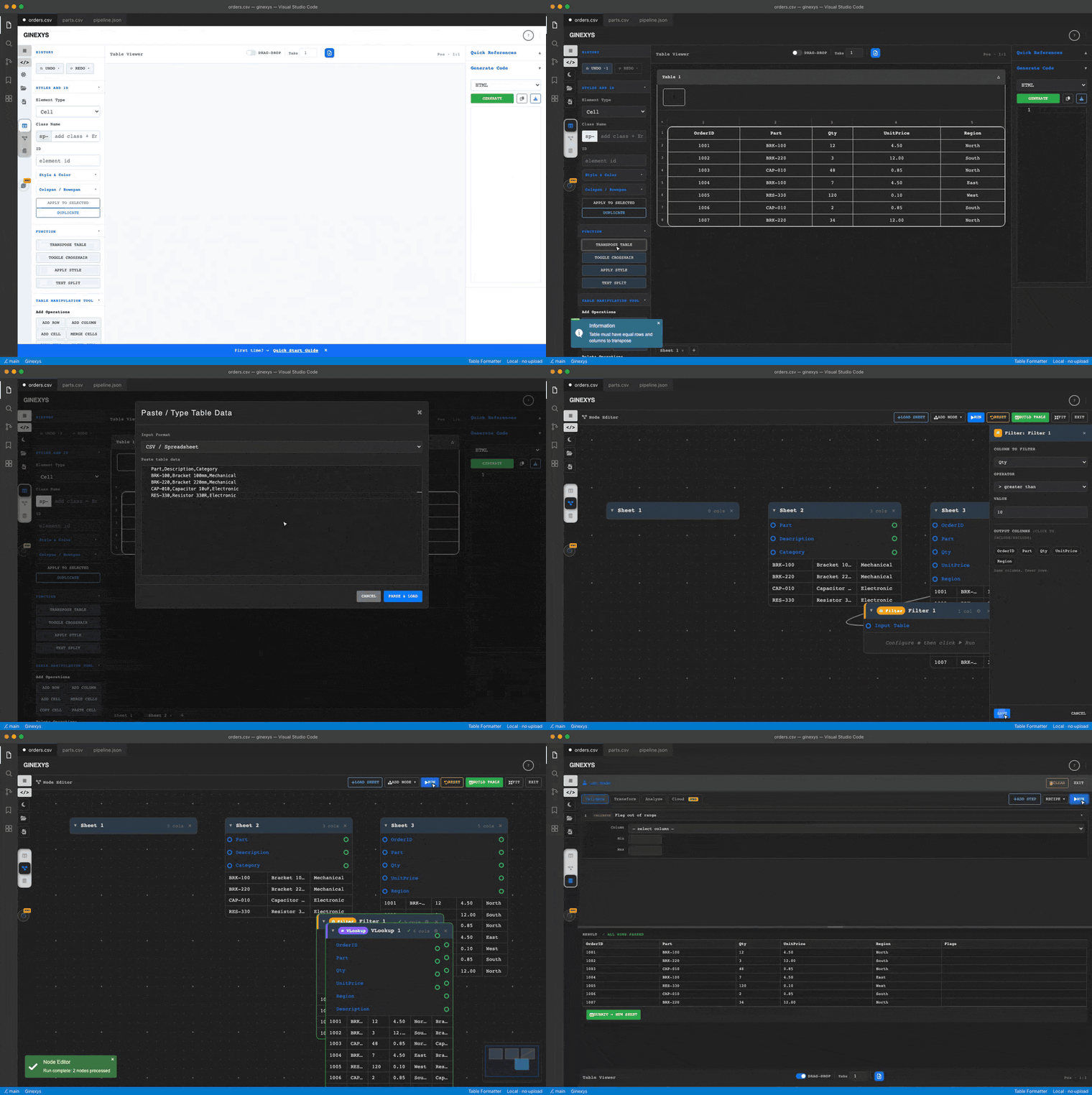
Table IDE (Table Formatter and Node Editor) is a comprehensive tool designed for parsing, editing, and formatting HTML tables. Whether you are converting raw data into a structured grid or performing complex data transformations, Table IDE provides a visual interface to streamline the process.
core Workflow
- Import Data: Load existing tables from files or paste raw data.
- Edit Visually: Use the grid editor to manipulate cells, rows, and columns.
- Apply Styles: Utilize built-in classes or custom CSS for formatting.
- Export: Generate clean HTML, JSON, or Markdown code.
1. Importing Data
TABLE_IDE supports multiple input formats:
- File Upload: Select the Load File icon in the sidebar to import
.csv,.tsv,.txt, or.htmlfiles. - Text Input: Select the Import icon to open a modal where you can paste HTML, ASCII, CSV, or plain text.
- Draw Mode: For unstructured data, use Draw Mode to manually assign text to grid cells.
Supported Formats
| Format | Description |
|---|---|
| HTML | Parses standard <table>, <tr>, <td> structures. |
| CSV / TSV | Standard spreadsheet exports (Comma or Tab separated). |
| ASCII | Formatted text tables (e.g., from terminal outputs). |
| Plain Text | Raw text processed via the Text Split function. |
2. Interface Overview
The interface is divided into three primary regions:
Left Panel: Tools & History
- History: Undo and Redo operations.
- Styles & ID: Apply CSS classes, IDs, and inline styles (colors, spacing).
- Functions: Advanced operations like Transpose Table and Text Split.
- Manipulation: Rapid addition and deletion of rows, columns, and cells.
Center Panel: Table Viewer
- Active Editing: Select cells by clicking, or use Shift + Click for range selection.
- Drag & Drop: Toggle the DRAG-DROP switch to reorder rows and columns visually.
- Navigation Tabs: If multiple sheets are loaded, switch between them using the bottom tab bar.
Right Panel: Configuration & Code
- Instruction: Quick reference for keyboard shortcuts and built-in classes.
- Generate Code: Select your output format (HTML, JSON, Markdown, etc.) and generate the final code.
3. Basic Editing Operations
Selecting Cells
- Single Cell: Click any cell to select it.
- Multi-Select: Hold
Ctrl(orCmd) and click individual cells. - Range Selection: Click a starting cell, hold
Shift, and click an ending cell. - Select All: Use the standard browser shortcuts or context menu.
Modifying Content
- Double-Click: Activates the inline editor for a cell.
- Context Menu: Right-click to access operations like Edit Content, Merge Selected, and Delete.
Keyboard shortcuts
| Shortcut | Action |
|---|---|
Insert | Insert cell |
Delete | Delete cell |
Alt+Shift+W | Merge cells |
Alt+Shift+T | Text split |
Alt+Shift+X | Apply text split |
Ctrl/Cmd+click | Multi-select cells |
Shift+click | Range select |
Double-click | Edit cell content |
Structural Updates
Use the Table Manipulation Tool in the left panel to:
- Add rows/columns before or after the selection.
- Merge adjacent cells into a single entity.
- Transpose the entire table (swap rows and columns).
4. Saving and Exporting
Once your table is formatted:
- Navigate to the Generate Code section in the right panel.
- Choose the desired Export Format.
- Select Generate to populate the output editor.
- Select Copy to retrieve the code for your project.
Tip: Use the Node Editor for advanced data pipelines if you need to perform relational joins or complex filtering before exporting.